Make room for work
Keep video meetings and everyday work moving while others use the connection. Use Ethernet at your desk when a consistent connection matters.
 Check my address
Fibre broadband · New Zealand
Work. Study. Stream.
Room for your whole day.
For households doing more at once. A 500/100 Mbps fibre connection gives work calls, study, streaming and larger downloads more room to share.

Fibre 500 is available at eligible fibre addresses, subject to your local fibre network. RileyNet will check your address and confirm the available service. Speeds are not guaranteed and may vary. Router and setup costs are separate from your monthly plan.
Is this your plan?
More capacity for shared connections, busy evenings and working from home.
Keep video meetings and everyday work moving while others use the connection. Use Ethernet at your desk when a consistent connection matters.
Give streaming, study and browsing more capacity to share. The 500 Mbps download profile provides more headroom than Fibre Starter.
Larger downloads can finish sooner when the server and your equipment can keep up. The 100 Mbps upload profile also gives file transfers more room.
Fibre 500 has five times Fibre Starter’s download and upload access-profile capacity. It helps most with large transfers and simultaneous use; it does not make every website five times faster.
Both bars use a 900 Mbps scale. Access profiles, not guaranteed speeds. Your devices, Wi-Fi, network conditions and the service you use affect results.
The RileyNet router
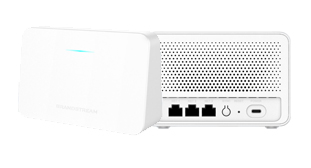
Ready for your connection
Add a Grandstream Wi-Fi 6 router configured for RileyNet. Connect it to your fibre ONT and we’ll help with the next steps.
No monthly rental. Delivery quoted separately. Wi-Fi coverage depends on your home; larger homes may need extra equipment.
Bring a compatible Ethernet WAN router for $50 one-off service setup. You configure it using the settings we provide. BYO router, Wi-Fi and mesh support are not included. See BYO requirements.
Know what you’re paying
Fibre 500 is $100/month including GST, whichever router option you choose.
We’ll confirm your address, connection requirements and any additional charges before you agree.
| Cost | RileyNet router | Bring your own |
|---|---|---|
| Fibre planMonthly · incl. GST | $100/month | $100/month |
| Router purchaseOne-off | $129 | Use your ownCompatible router required |
| Standard setupOne-off | $0Included with router | $50 |
| One-off totalBefore additional charges | $129 | $50 |
Delivery, additional Wi-Fi equipment and non-standard work are extra and quoted separately. Your quote sets out service terms, data allowance or fair-use conditions, cancellation rules and support arrangements.
Find your fit
Choose the capacity your household needs. Every connection is subject to address eligibility.
$65 /month incl. GST
100/20 Mbps download/upload
Everyday use in smaller households. Eligible residential Chorus addresses.
View Fibre Starter$95 /month incl. GST
500/100 Mbps download/upload
More room for work, study and streaming at the same time.
Check my address$115 /month incl. GST
900/500 Mbps download/upload
More capacity for busy homes, large downloads and uploads.
View Fibre MaxLet’s get you connected
Interested in Fibre 500? Send us a few details. Riley will check your address and help with the next steps.
Tell us where you’d like your fibre connected.
We’ll check availability, costs and your router choice.
Agree the details before we arrange your connection.
An enquiry does not start a subscription or take payment. Keep your current service active until your changeover is confirmed.
Thanks for getting in touch. Riley will reply after checking your details.
Your enquiry has been accepted for delivery. No order or payment has been made.
Good to know
Clear answers before you connect. If there’s anything else, ask Riley.
Fibre 500 is a useful step up for shared households, people working or studying from home, and anyone who downloads larger files. It offers more capacity than Fibre Starter when several activities happen at the same time.
Its access profile is five times higher in both directions: 500/100 Mbps compared with 100/20 Mbps. Actual results depend on your equipment, Wi-Fi, the network and the service you are using. Small websites or apps may not feel noticeably different.
Fibre Max costs $20 more per month and increases the access profile to 900/500 Mbps. Consider it for frequent large uploads or heavier simultaneous use. Fibre 500 may already be enough for your usual work, streaming and study.
The $95 monthly plan price includes GST. The RileyNet Wi-Fi 6 router is a separate $129 one-off purchase with $0 standard setup. If you bring your own compatible router, service setup is $50 one-off. Delivery, extra equipment and non-standard work are quoted separately.
Your quote and service agreement will confirm the data allowance or fair-use conditions, service term, notice period and any early cancellation charges before you agree. Ask Riley if you need these details before choosing a plan.
Wait until your changeover is confirmed before cancelling anything. RileyNet can discuss a transfer or a separate ONT-port connection where available. Check your existing contract, notice period, landline needs, router returns and any bundle discounts.
You can contact RileyNet for personal connection support and use the setup and help guides. We coordinate upstream faults where needed. Support is best effort; 24/7 support and a business service-level agreement are not included. BYO router, Wi-Fi and mesh support are excluded.